One window to make it yours.
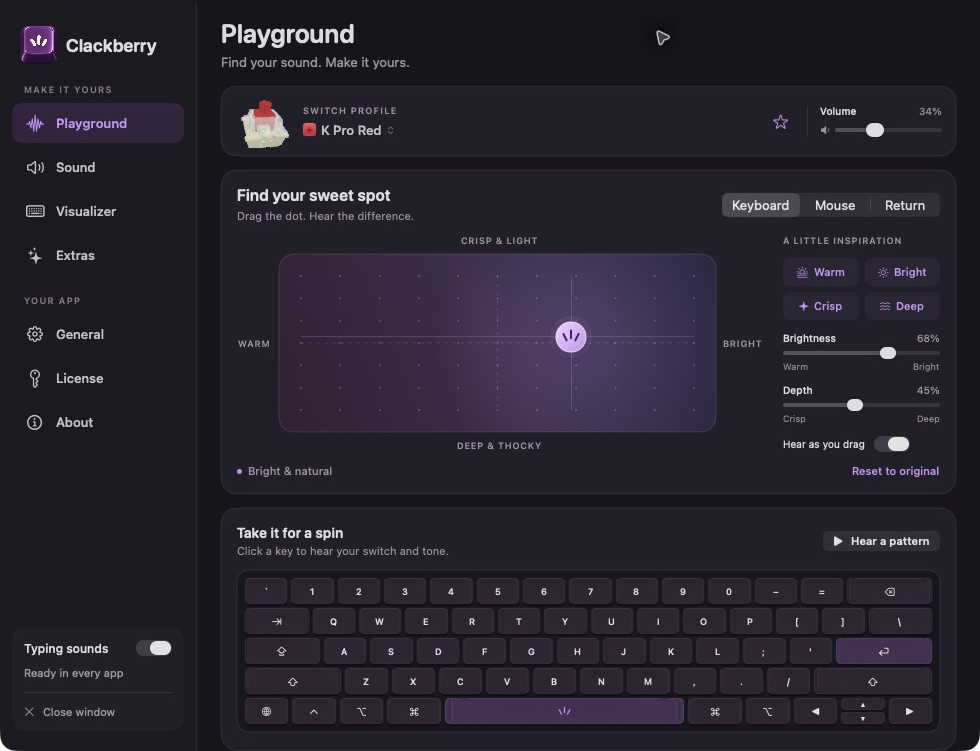
Playground, Sound, Visualizer and Extras — every control in a native Mac window that saves as you go.
Sound starts when you play. Nothing plays on its own.
Real mechanical keyboard sounds for the keyboard you already own. Twenty-two switches, spatial audio and a tone you tune yourself, running quietly from your menu bar.
22 switches · 599 recordings
Linear, tactile, clicky, vintage. Each one is a set of real recordings, with its own press and release, placed where the key sits. Choose one, then type.
Sound Playground
Drag the dot: warmer or brighter, crisper or deeper. The same tone pad as the app reshapes the recordings as you move, and the water shows you what changed.
Original recording
Mouse & Return
ClickTap anywhere on the water. Your mouse gets a sound of its own, and Return gets a flourish when a line deserves one.
Plays instead of your switch’s Return.
Privacy
Input Monitoring sounds scary, so here’s exactly what it gives Clackberry: which key moved, and whether it went down or up. That’s all it needs to pick and place a sound.
You type
Meet me at 6. The door code is 4‑8‑1‑2
Clackberry receives
keyCode 46keyCode 46keyCode 14keyCode 14keyCode 14keyCode 14keyCode 17Everything inside
Everything else that comes with it.
Playground, Sound, Visualizer and Extras — every control in a native Mac window that saves as you go.
Every key plays from where it sits on your keyboard. Tune the width, add a far-side thump, and turn on AirPods head tracking on macOS 14 or later.
A floating keyboard, combo counter or keystroke trail over any app — 15 keyboard themes, 9 combo colors. Pin it, let it follow your cursor, or let it wander.
Give any key its own switch, tone and volume. Soften the home row, tame the spacebar, hush the modifiers.
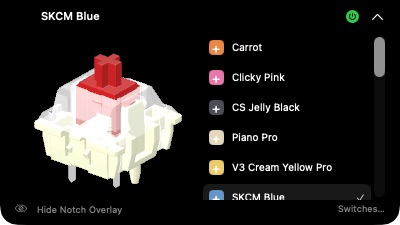
A 3D keyboard or switch drops from the top of your screen, with favorites and switches a click away.
Save a switch with its tone and volume, and jump back to it in one click.
Triple-tap ⌘K to toggle sounds from anywhere. Or record your own shortcut.
8D Sound sends keystrokes orbiting your head. Lizard swaps your keys for gecko chirps. Faah is… a lot.
Pricing
No subscription, no account, no tiers. Just Clackberry, and a keyboard you’ll look forward to using.
Personal license
$19.99USD · one time
Secure checkout with Stripe · License delivered by email
Clackberry is a Mac app. It adds mechanical keyboard sounds to the keyboard you already use — built in, wired, or wireless. The keyboard on this page is an interactive demo.
The complete Clackberry app for one Mac at a time, all 22 switch profiles, sound customization, visualizers, and all future updates. One payment. No subscription.
No. The app uses physical key codes and press/release events to trigger sounds. It does not read or store your typed text. This website’s demo reads which key moved, never what you wrote, and only while its keyboard is on screen. Nothing is stored or sent.
Yes, right here. The keyboard at the top of this page plays the same original recordings the app uses. Downloading is free too; a license key activates sounds across your Mac.
Yes. Deactivate your current Mac in Clackberry’s License settings, then activate on your next Mac with the same key. If your old Mac is unavailable, use email recovery to release it.
You need an internet connection for initial activation. After a successful license refresh, Clackberry can work offline for up to 30 days. Reconnect to renew that allowance.
Clackberry requires macOS 13 Ventura or later and runs natively on both Apple silicon and Intel Macs. There is no Windows version.
Not for you? Email support@clackberry.com within 14 days of purchase for a full refund. Please contact us from your purchase email address. Refunding a purchase deactivates its license; an offline Mac may retain access until its current receipt expires. This policy does not limit your applicable statutory rights. Refund details
No purchase needed to download. A license key activates the app.